How FinOps and GDPR led to better security for Memolog
Memolog is a personal website. I did not set out to give it an enterprise security architecture.
The work began with several separate questions: How much was Azure costing me? What did GDPR and privacy mean for a site accessed from outside Japan? How much data should I collect in Application Insights? As I investigated real traffic and the site’s attack surface, those questions led me to Front Door, WAF, Azure Policy, Microsoft Sentinel, DNSSEC, and security exercises.
What particularly surprised me was an Azure Front Door report showing traffic from around the world. I may think of Memolog as a small, primarily Japanese-language site, but publishing it connects it to the entire internet.
Rather than cataloging Azure services, this article traces the questions that started the work, what I observed, how I organized the threats, and how those findings became controls and operational practices.
Table of Contents
- Key takeaway
- It started with FinOps and privacy
- Front Door revealed traffic I had not seen
- OWASP and real-world cases reshaped the attack surface review
- STRIDE shifted the focus from products to threats
- Use Azure Policy in Audit mode to learn before enforcing controls
- The current architecture separates defenses from evidence
- Exercises validate what implementation alone cannot
- What I learned from securing a personal site
- Conclusion
- References
Key takeaway
The most important lesson was that security is not a matter of adding services. It is a continuous cycle:
- Define your purpose: Clarify the data to protect, acceptable costs, and legal or operational constraints.
- Observe: Use Front Door, Application Insights, and Log Analytics to see actual traffic and changes.
- Organize threats: Identify trust boundaries and attack paths through OWASP, STRIDE, and real-world incidents.
- Apply controls: Turn the findings into WAF controls, managed identity, Azure Policy, DNSSEC, and CI permission boundaries.
- Exercise: Use Sentinel incidents and tabletop exercises to verify detection and recovery workflows.
- Track remaining risks: Don’t mark unproven items as “addressed”; assign an owner and a deadline.
The Azure Well-Architected Framework covers Reliability, Security, Cost Optimization, Operational Excellence, and Performance Efficiency. For Memolog, stricter WAF controls increase costs and log volume, while collecting fewer logs weakens investigative capability. Instead of maximizing one pillar, I had to balance them against the site’s scale and the assets that needed protection.
It started with FinOps and privacy
I started by understanding costs and data, not by implementing attack defenses.
Why I started with FinOps
Azure makes it easy to start small, but logs, requests, Functions executions, and Storage transactions all generate usage-based costs. Security services such as Front Door Premium, Log Analytics, Sentinel, and Defender for Cloud add costs of their own.
Yet shortening log retention, removing monitoring, or reducing redundancy to save money makes investigations and recovery harder. The Cost Optimization and Security trade-off in the Azure Well-Architected Framework recommends weighing the cost of security controls against the impact of a breach and not cutting controls below the agreed risk level.
Rather than maximizing every service, I assigned each one a specific role:
| Target | Policy |
|---|---|
| Daily Application Insights / operational logs | 30-day retention with a 0.1 GB/day cap |
| Front Door access / WAF logs | Store in a dedicated Log Analytics workspace for 90 days with no daily cap |
| Long-term security evidence | Store for 365 days in ZRS Storage |
| Hot Topics / ViewCounts | Use ZRS and default to rebuilding and re-collecting the data after a regional outage |
| Costly security features | Evaluate actual risk and cost and decide case-by-case |
This design does more than reduce costs. It sets spending limits while sending evidence that must not be lost through a separate path.
Insights from GDPR and consent management
The Application Insights browser SDK handles anonymous IDs, session data, and browser information. Publishing only aggregate view counts does not automatically make the underlying telemetry non-personal data.
I therefore load the SDK only after the user consents to analytics, and send no telemetry if consent is denied or later withdrawn. Referrer data is reduced from a full URL to a hostname. Campaign parameters are limited to three approved keys and restricted values. Published view-count snapshots contain no raw user ID, session ID, IP address, or geographic information.
Thinking through GDPR expanded the scope beyond consent at collection time. I also had to consider purpose, retention, access rights, deletion, processors, and preserving evidence during an outage. Privacy and security are not separate workstreams here. Both depend on deciding what data to retain, why it is needed, where it belongs, and how long to keep it.
Front Door revealed traffic I had not seen
Azure Front Door Premium and WAF changed my perspective by making activity at the site’s edge visible.
Reports in the Azure portal showed requests from North America, South America, Europe, the Middle East, Asia, Oceania, and other regions. A primarily Japanese-language personal site is still reachable by search engines, legitimate crawlers, unknown bots, automated vulnerability scanners, and ordinary visitors regardless of national borders.
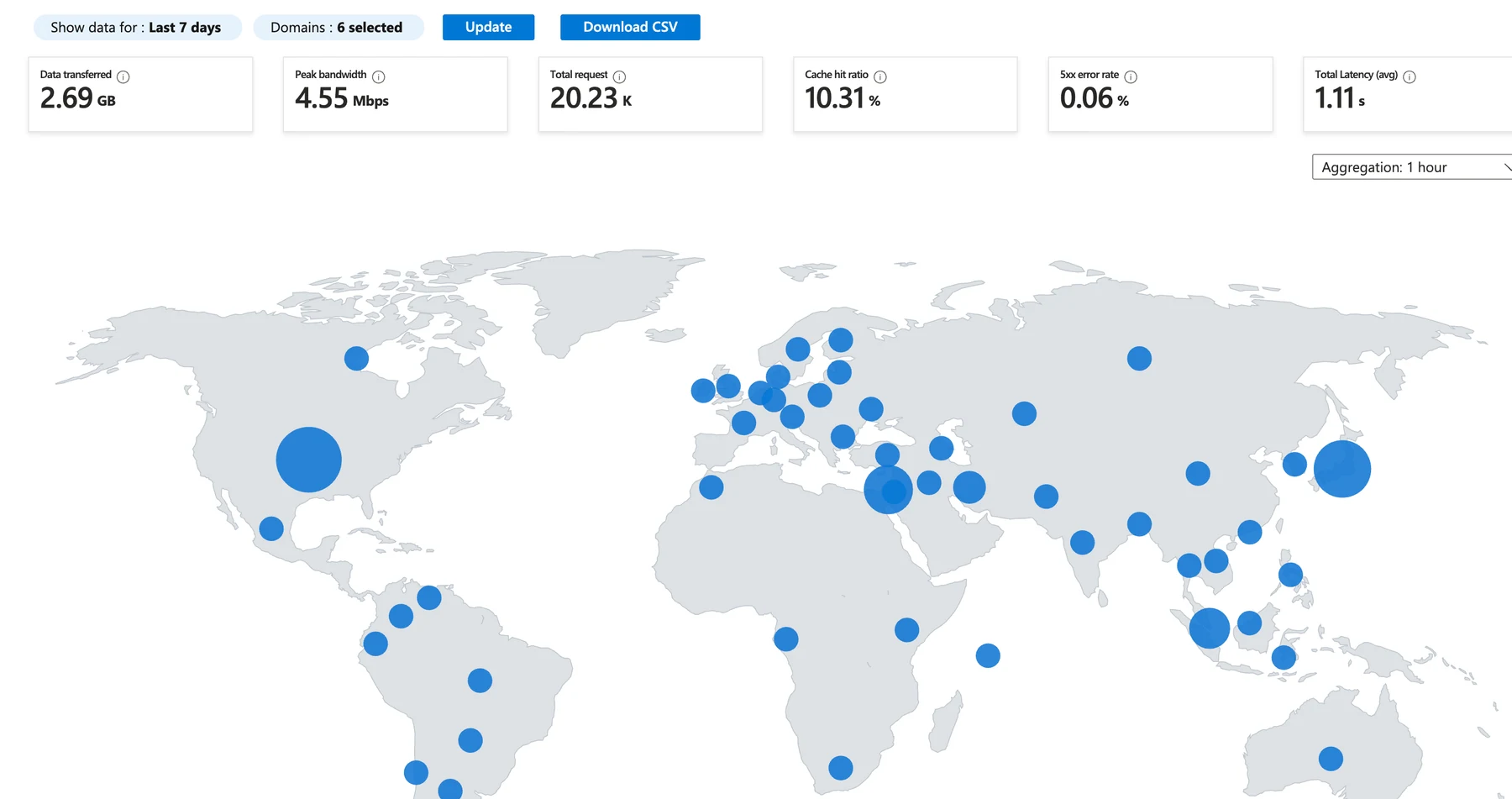
However, it’s incorrect to label every point on the map as an “attacker.”
| Data | What it reveals | What it does not directly prove |
|---|---|---|
| Front Door access log | Requests routed through Front Door, responses, cache behavior, client IP–derived region, and more | Whether the requester is a human or a bot, or whether intent is benign or malicious |
| WAF log | Requests that matched WAF rules, the matching rule, and the action taken | Whether the match reflects a real attack or a false positive |
| Bot Manager | Rule-based classification and actions for good bots, bad bots, and unknown bots | The ultimate intent of unknown bots |
| Application Insights | Page views and application telemetry after consent | All HTTP requests, including those made before consent |
The official Azure Front Door monitoring documentation explains that access logs record requests passing through Front Door, while WAF logs support investigations of potential attacks and false positives. Access and WAF logs are not enabled by default; their destinations must be explicitly configured in diagnostic settings.
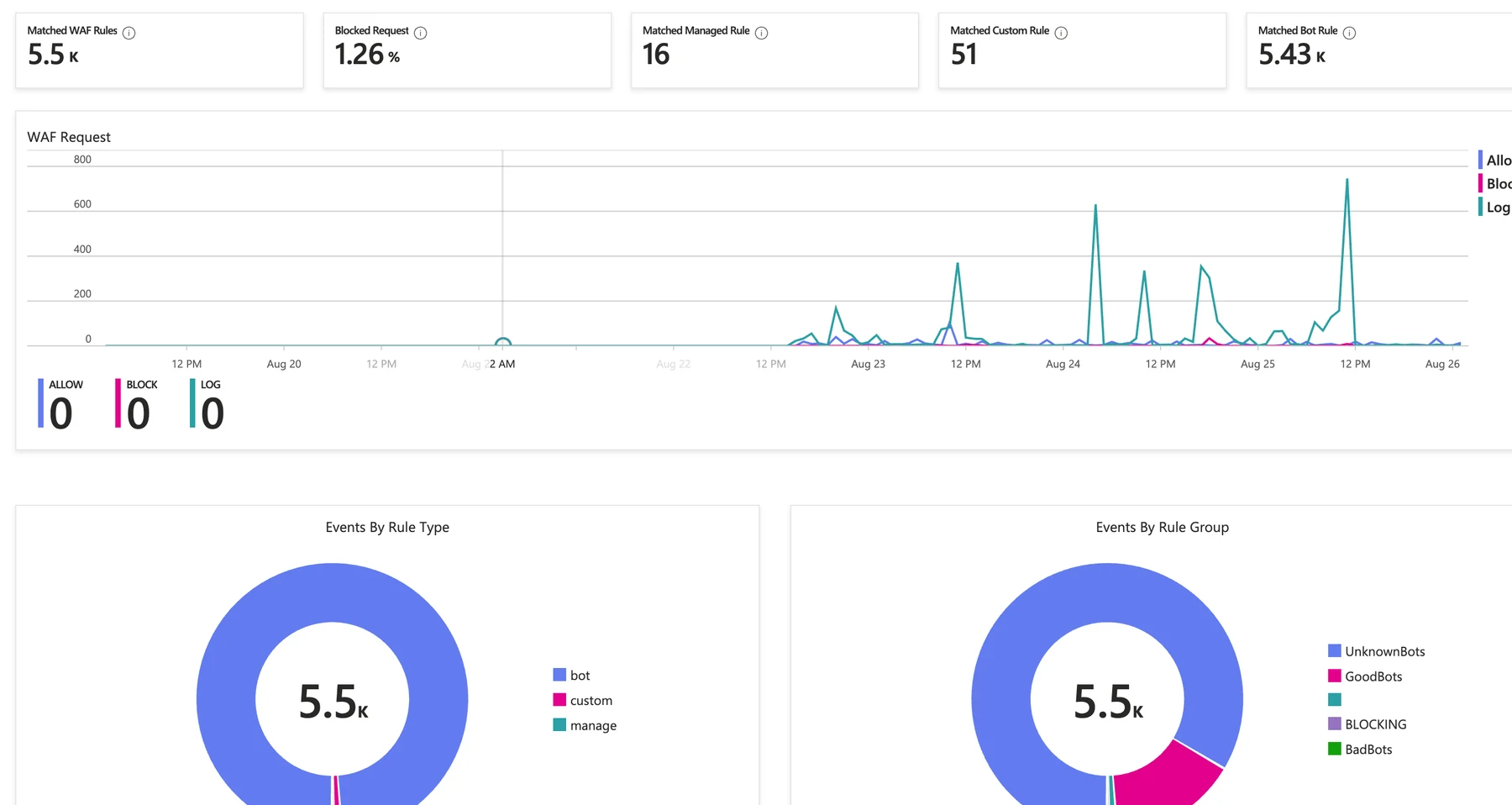
Bot Manager in the Premium tier uses default actions that block bad bots, allow good bots, and log unknown bots. Memolog runs WAF in Prevention mode, so the edge handles matching requests according to each configured action.
Premium did not cause the worldwide traffic. It gave me Front Door reports, WAF, bot rules, and Log Analytics to observe and classify traffic that had already been reaching the site.
OWASP and real-world cases reshaped the attack surface review
WAF managed rules make familiar attacks such as SQL injection and cross-site scripting easier to recognize. The Azure Front Door WAF Default Rule Set is based on the OWASP Core Rule Set and also includes rules from Microsoft Threat Intelligence.
However, the highest priority issue from Memolog’s attack-surface review was not a classic SQL injection.
The anonymous Hot Topics search API could originally scan multiple partitions during searches or lookups for nonexistent article IDs. Repeated expensive requests could increase Functions execution time, scale-out, Storage transactions, and telemetry. An attacker does not have to steal data to target compute consumption and cloud costs.
I implemented the following mitigations:
- Pre-generate a search index instead of scanning every record for each request
- Retrieve articles with a PartitionKey/RowKey point read
- Limit query strings, request bodies, arrays, and strings
- Allow feed-derived URLs only when they use
https:and a known hostname - Add rate limits and detection for distributed, low-rate API traffic
- Restrict direct origin access and route traffic through Front Door
- Keep unnecessary status details and management operations off the public interface
Examples of credential leakage and administrator lockout also led me to think beyond normal defenses: how to revoke credentials after assuming a leak, how to recover after losing an MFA device, and how to receive notifications when the monitoring platform itself is down.
Incorporating real-world cases into threat models reveals operational gaps that checklists often miss.
STRIDE shifted the focus from products to threats
As controls accumulate, the architecture can turn into a product checklist: “Front Door installed” or “Sentinel enabled.” I used STRIDE instead to organize Memolog’s assets, entry points, trust boundaries, owners, and residual risks.
| Category | Example considered at Memolog | Primary controls |
|---|---|---|
| Spoofing | Using a deployment identity from a different repository/branch | GitHub OIDC issuer/audience/main subject |
| Tampering | Altering workflows, Bicep, or security logs | Actions pinned to full commit SHAs, Git history, independent archive |
| Repudiation | Disputing who made a management change or why it was made | GitHub Issue, Activity Log, Sentinel incident |
| Information Disclosure | Leakage of telemetry, secrets, or raw logs | Consent gating, masking, managed identity, log hygiene |
| Denial of Service | High-cost API processing, distributed L7 attacks, hitting daily caps | WAF, rate limits, query optimization, separate security workspace |
| Elevation of Privilege | Lateral movement via excessive runtime or deployment identity permissions | Identity separation, resource-scoped RBAC, periodic audits |
What mattered in this exercise was not just listing controls but documenting remaining risks and owners.
For example, evidence is retained in archive storage for 365 days, but immutability is not yet enabled. Locking it before validating writes, lifecycle deletion, and recovery could disrupt operations. The decision should follow verification of both the protection benefit and the recovery impact, not simply the availability of the feature.
Use Azure Policy in Audit mode to learn before enforcing controls
I had thought of Azure Policy mainly as a way for enterprises to restrict regions and SKUs. It can also continuously evaluate Azure resources against organizational rules and surface deviations.
Typical effects differ as follows.
| Effect | Action | When to use it |
|---|---|---|
Audit | Does not block the request; creates a warning in the Activity Log and marks the resource non-compliant | First step for understanding impact and exceptions |
Deny | Rejects create/update requests that do not meet the conditions | Stable guardrail after thorough validation |
Modify | Modifies part of the request, such as tags | Safe for automatic correction |
DeployIfNotExists | Deploys required related resources or settings | Standardize items like diagnostic settings |
The Azure Policy custom policy tutorial recommends Audit as a good starting point for understanding a policy’s impact before switching to Deny.
For Memolog, I assigned an Audit baseline that checks whether:
- Public network access is disabled
- Storage shared key authorization is not in use
- Secure transfer is required
- Diagnostic settings are configured
- Resources that need a managed identity or a private endpoint have them
- Tags such as environment, owner, and cost are present
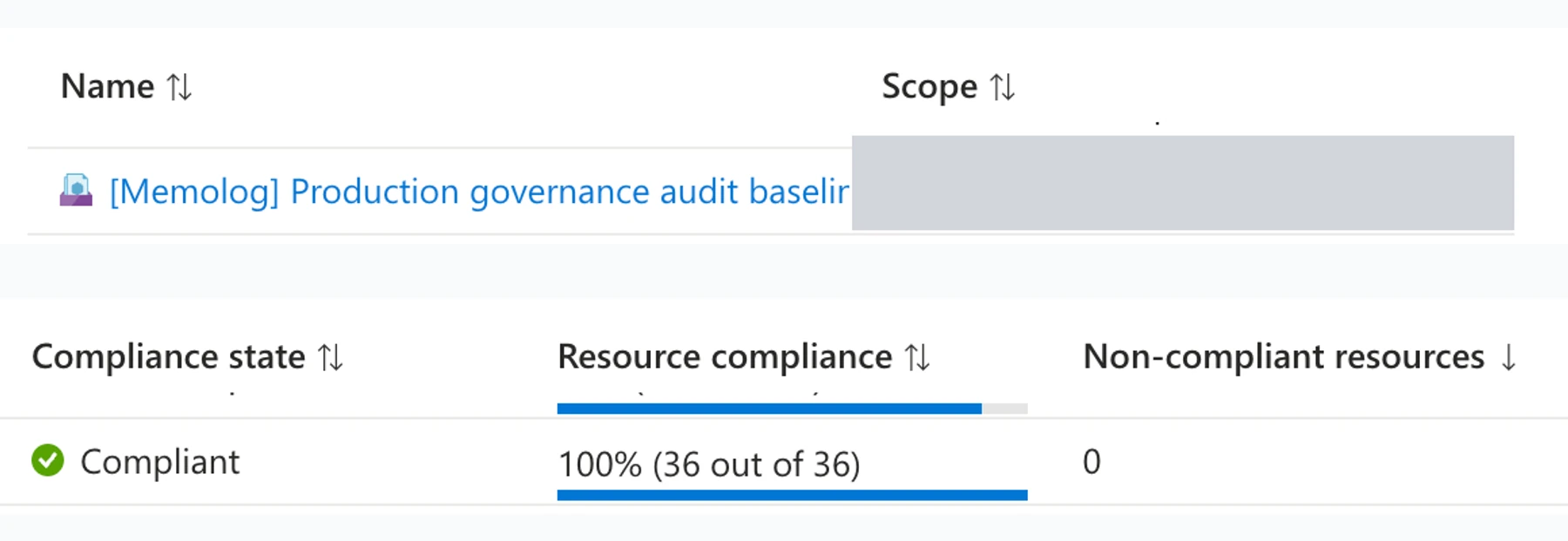
Setting every rule to Deny from the start can unexpectedly block updates to existing resources or an emergency recovery. It is safer to review compliance state first, resolve false positives and exceptions, and enforce only rules with a verified need and rollback path.
Policy is not only a way to restrict users. It can act as an automated review that detects when your own design principles drift over time.
The current architecture separates defenses from evidence
As of August 26, 2026, the architecture separates the public ingress, data plane, security evidence, and control plane as follows.
Public ingress
www.memobog.netuses Azure Front Door Premium as the entry point- WAF runs in Prevention mode with managed rules, Bot rules, and custom rate limits
- Static pages are routed to Azure Static Web Apps, and
/api/*is routed to Azure Functions - The Functions origin is restricted to Front Door through the
AzureFrontDoor.Backendservice tag andx-azure-fdid - The public management API and
/adminhave been removed; retired routes return404
Data and identity
- Hot Topics and ViewCounts are stored in ZRS Storage with public network access and shared key authorization disabled
- Functions connect to Storage through a private endpoint and use a managed identity plus RBAC scoped to the resource
- Collection, translation, view-count synchronization, and archive recovery run on timer triggers, so management operations are not exposed externally
- GitHub Actions workflows sign in to a user-assigned managed identity (UAMI) through OIDC without long-lived client secrets
- Pull-request jobs do not use Azure login or repository secrets
Observability and security evidence
- Application Insights and the operational Log Analytics workspace are used to monitor routine performance and failures
- Front Door access and WAF logs are delivered concurrently to a dedicated security Log Analytics workspace and to archive storage
- Microsoft Sentinel creates and classifies incidents with 9 analytics rules and 4 automation rules
- Defender for Cloud, Activity Log, and Azure Policy compliance are used to review configuration changes and security posture
DNS and supply chain
- Azure DNS zone signing and a DS record in the parent
.netzone establish the DNSSEC trust chain - CAA restricts certificate issuers to DigiCert
- Transfer lock and two-factor authentication are enabled at the registrar
- GitHub Actions workflows use job-level permissions and pin actions to full commit SHAs
- As part of the deployment credential inventory, the
BACKFILL_TOKENsecret is also removed once workflows no longer reference it
The guiding principle is to avoid consolidating everything into one workspace or identity. If the application is compromised, the same privileges should not be sufficient to delete its security evidence. Deployment identities, runtime identities, and human administrator identities therefore remain separate.
Exercises validate what implementation alone cannot
Lines on an architecture diagram do not prove that an incident will be created, assigned, investigated, and closed.
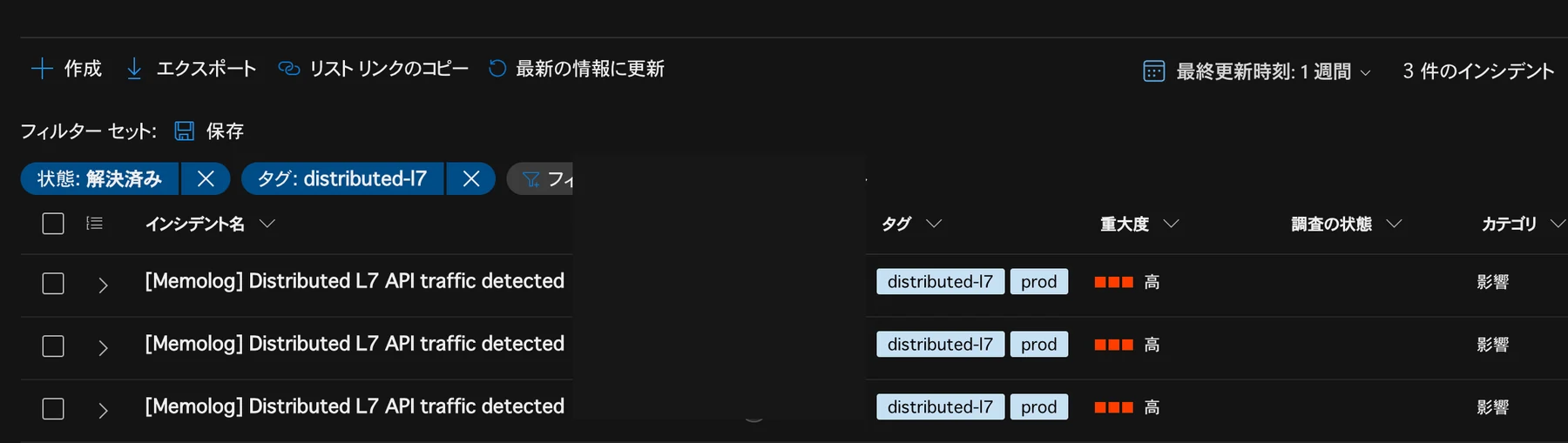
I ran a controlled distributed L7 exercise for Memolog and verified the following behavior in Sentinel:
- An incident is created
- The owner is set automatically
- Labels
prodanddistributed-l7are applied - The investigation can cover client IPs, URIs, origin reachability, 429 responses, and per-source peaks
- No automatic blocking is performed; after verification the incident is closed with
BenignPositive
I also reviewed three scenarios in tabletop exercises.
| Scenario | Confirmed decision | Remaining challenges |
|---|---|---|
| SWA deployment token leakage | Prioritize revoking the token over investigation, and do not fall back to the old token | Actual rotation and recovery in production remain unproven |
| Monitoring loss / daily cap | Distinguish the capped workspace from the independent security destination | Automated notifications that remain available when the primary monitoring path fails are still unproven |
| Administrator lockout | Recover Azure, GitHub, and the registrar separately without disabling MFA/Conditional Access globally | A tested recovery path and the actual RTO remain unproven |
Azure incident response guidance follows the NIST SP 800-61 stages: preparation; detection and analysis; containment and recovery; and post-incident activities. Tabletop exercises do not prove actual recovery times, but they let you confirm decision order, stop conditions, rollback plans, owners, and required evidence before an incident occurs.
“Configured” and “usable” are not the same. I track the unproven rotation procedure, independent monitoring signal, and administrator recovery path as GitHub Issues with deadlines.
What I learned from securing a personal site
A small site still has a large public surface
Even with few users, public hostnames and APIs are discoverable by crawlers and automated scans. Low page views do not imply few HTTP requests or attack attempts.
Security and FinOps are design constraints, not opposing forces
Collecting unlimited logs is not the answer, but neither is disabling them all to save money. Cost and retention can be set by purpose: keep investigation logs in a separate workspace and archive, and cap routine telemetry.
Policy helps regardless of organization size
Azure Policy isn’t only for large enterprises. Even if you manage things alone, you may not remember your design decisions months later. Simply detecting drift with Audit has value.
Consider eliminating the management API instead of just securing it more tightly
Before making authentication more complex, I asked whether each operation needed to be exposed to the internet at all. Scheduled work moved to timer triggers with a managed identity, reducing the number of public entry points.
A threat model is never finished
Adding new APIs, identities, secrets, data stores, or external integrations changes the trust boundary. After major incidents or failed exercises, update your STRIDE analysis and runbooks.
Conclusion
Memolog’s security improvements did not begin with WAF.
They began with FinOps questions about Azure costs, GDPR and privacy considerations for international visitors, and uncertainty about how much Application Insights data to collect. Front Door exposed the reality of requests arriving from around the world. OWASP and real-world cases highlighted API cost attacks and credential leakage, and STRIDE helped me organize trust boundaries and ownership.
Those findings became WAF controls, managed identity, OIDC, Azure Policy in Audit mode, independent security logs, Sentinel, DNSSEC, and the removal of public management APIs. Controlled exercises and tabletop sessions then tested whether those measures were usable.
It’s not finished. Recovery paths and monitoring signals remain unproven. Still, this cycle of observing, articulating threats, codifying rules, exercising, and tracking open issues now gives me a clear basis for evaluating future changes.
A personal site does not need every security product from day one. Start by deciding what to collect, what to protect, and which risks and costs to accept. Then enable ingress logs and observe real traffic and changes. That evidence makes it easier to choose the controls the site actually needs.
References
- What is the Azure Well-Architected Framework?
- Monitor Azure Front Door
- Azure Web Application Firewall on Azure Front Door
- Azure Policy definitions audit effect
- Tutorial: Create a custom policy definition
- Incident response overview for Azure
- Clarifying the differences between Azure Front Door Standard and Premium
- Designing Azure infrastructure with GitHub Copilot
- Choosing Azure FinOps AI through the lens of AWS FinOps Agent