Building a multi-tenant Microsoft Foundry chat with Microsoft Entra ID
Even within the same corporate group, each group company may manage its employees in a separate Microsoft Entra ID tenant. This article covers a scenario in which several customer companies share one AI chat service operated by a service provider.
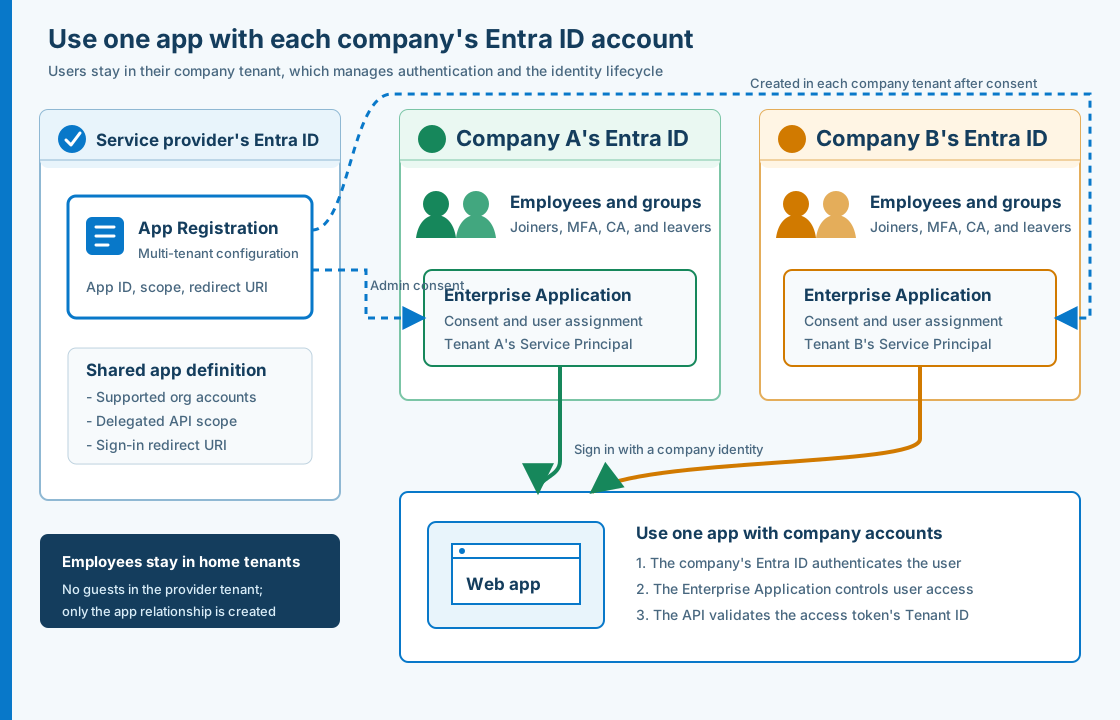
Rather than consolidating users as guests in the service provider’s Microsoft Entra ID tenant, the solution uses the employee accounts managed by each customer company. It combines a multi-tenant App Registration for organizational accounts with an Enterprise Application created in each customer tenant. Identity management, including MFA, Conditional Access, and account deactivation when an employee leaves, remains with each customer company, while the service provider’s API restricts access to an allowlist of Tenant IDs.
This article describes the architecture used for a Microsoft Foundry chat demo, how to add a tenant, the validation required by the API, and the causes of the HTTP 403 errors encountered during implementation. All environment-specific values, including Tenant IDs, Application IDs, and resource names, have been replaced with placeholders.
Table of Contents
- Key takeaways
- Requirements and architecture
- App Registration and Enterprise Application roles
- Configure Microsoft Entra ID
- Check allowed tenants at two layers
- Onboard a customer company
- Restrict users within each customer company
- Call Foundry without keys over a private network
- Why we did not use External ID
- Implementation issues
- Verification
- Additional production considerations
- Summary
- Official sources
Key takeaways
We needed to meet four requirements:
- Offer one system operated by the service provider to multiple customer companies that use different Microsoft Entra ID tenants
- Keep users as Member users in their customer company’s Workforce tenant without creating guest users in the service provider’s tenant
- Leave MFA, Conditional Access, and account lifecycle management for joining and departing employees with each customer company
- Let the service provider restrict which customer companies may use the service, while letting each customer company restrict which of its employees or groups may use it
For these requirements, a multi-tenant App Registration for standard Workforce tenants was a better fit than an external tenant in Microsoft Entra External ID.
The service provider owns one App Registration. When a customer company consents to the app, a Service Principal is created in that company’s tenant and can be managed as an Enterprise Application in the Microsoft Entra admin center. Users remain Member users in their customer company’s tenant and are not copied into the service provider’s tenant.
However, configuring an app as multi-tenant does not by itself prevent arbitrary organizations from using it. This architecture limits access at three layers.
| Control point | What it controls | Implementation in this architecture |
|---|---|---|
| Customer company’s home tenant | Identity verification and sign-in conditions | Use the customer company’s MFA, Conditional Access, and account lifecycle management |
| Service provider’s API | Organizations allowed to use the service | Compare the validated access token’s tid with a Tenant ID allowlist |
| Customer company’s Enterprise Application | Users allowed within the tenant | Enable assignment requirements as needed and assign users or groups |
The browser also checks the Tenant ID so it can quickly tell users that their organization is not allowed. This improves the user experience, but the security boundary is the API-side token validation and Tenant ID check.
The connection to Foundry authenticates with a user-assigned Managed Identity attached to the App Service and Azure RBAC, while a Private Endpoint restricts the network path. End users do not need a Foundry API key or Azure RBAC permissions.
Requirements and architecture
We built a lightweight AI chat service operated as one system by the service provider. Users from multiple customer companies can sign in with their own Microsoft Entra ID accounts.
| Item | Architecture used |
|---|---|
| Users | Employees in the Workforce tenants of allowed customer companies |
| Web app | ASP.NET Core 10 on Azure App Service for Linux |
| Frontend | SPA, MSAL Browser, and Authorization Code Flow with PKCE |
| API | POST /api/chat, served from the same App Service as the SPA |
| Authentication | Multi-tenant App Registration for organizational accounts |
| Delegated API scope | access_as_user |
| Organization authorization | Compare tid with a Tenant ID allowlist in the API |
| Model | gpt-4o-mini deployed in Microsoft Foundry |
| Foundry authentication | User-assigned Managed Identity and Azure RBAC |
| Foundry network | Public Network Access disabled; access restricted to a Private Endpoint |
| Monitoring | Application Insights and Log Analytics |
The request flow is as follows:
- The user signs in through their customer company’s Microsoft Entra ID.
- The customer company’s tenant evaluates MFA and Conditional Access.
- The SPA obtains an access token for the Web API.
- The API validates the signature, issuer, audience, expiration,
access_as_userscope, andtid. - App Service uses its Managed Identity to obtain a token for Foundry.
- The app calls the model through App Service VNet integration and the Private Endpoint.
Only the web app is exposed to the internet. Foundry’s data plane cannot be reached from the public network.
App Registration and Enterprise Application roles
Understanding the difference between an App Registration and an Enterprise Application is central to this architecture.
Microsoft documentation describes the Application object as the app’s global definition and the Service Principal as its local representation in each tenant. An Application object has a one-to-many relationship with Service Principals.
| Object | Where it is created | Role |
|---|---|---|
| Application object | Service provider’s owning tenant | Holds the app-wide definition, including redirect URIs, exposed scopes, and supported account types |
| Service Principal | Each customer company’s tenant | Holds tenant-specific settings such as consent, user assignments, and sign-in controls |
| Enterprise Application | Displayed in the Microsoft Entra admin center | Provides the interface for managing a Service Principal within a tenant |
When a customer company’s administrator grants consent, a Service Principal is created in that company’s tenant. The company can then assign users to its Enterprise Application or disable sign-in.
The object created is an instance of the app, not a copy of an employee account. Users continue to sign in as Member users in their own tenant.
Configure Microsoft Entra ID
We created one app registration in the service provider’s Azure management tenant.
| Setting | Value |
|---|---|
| Name | An app name users can easily recognize, such as Group Corp AI Chat Demo |
| Supported account types | Multiple Entra ID tenants |
signInAudience | AzureADMultipleOrgs |
| Redirect URI platform | Single-page application (SPA) |
| SPA Redirect URI | https://<APP_HOST>/, exactly matching MSAL’s redirectUri |
| API Identifier URI | api://<APPLICATION_ID> |
| Delegated scope | access_as_user |
| Who can consent? | Admins and users |
| API permissions | Delegated access_as_user permission for the app’s own API |
| MSAL authority | https://login.microsoftonline.com/organizations |
| Client secret | Do not create one |
In the current Microsoft Entra admin center, select Multiple Entra ID tenants under Supported account types when registering the app. This corresponds to AzureADMultipleOrgs in the manifest’s signInAudience. Do not select Any Entra ID Tenant + Personal Microsoft accounts, which also allows personal Microsoft accounts, because this architecture targets only organizational accounts from customer companies.
If you enter a Redirect URI during registration, select Single-page application (SPA) as the platform. You can also omit it during registration and add it later under Authentication. In either case, the URI must exactly match the Redirect URI in the SPA’s authentication request, including the trailing / and any path.
The SPA requests a scope in this form:
api://<APPLICATION_ID>/access_as_userAfter exposing the scope under Expose an API, open API permissions, Add a permission, and then My APIs. Add access_as_user from the same app’s Delegated permissions. This registers access_as_user as a permission required for the app’s basic operation and lets the customer company’s administrator review the consent request. If permissions change later, users or tenants that previously consented may need to consent again.
A SPA is a public client that runs in the browser and cannot securely store a client secret. We used Authorization Code Flow with PKCE to obtain an access token for the API on behalf of the signed-in user.
The organizations authority is an entry point that accepts any Microsoft Entra organizational account. Using it alone does not express which customer companies are allowed to use the app.
Check allowed tenants at two layers
The API uses Microsoft.Identity.Web to validate access tokens.
- JWT signature
- Issuer
- Audience
- Expiration
- Delegated scope
access_as_user - Allowed Tenant ID
We pass the Tenant ID allowlist as an array in the App Service settings.
AllowedTenantIds__0=<TENANT_ID_A>
AllowedTenantIds__1=<TENANT_ID_B>
AllowedTenantIds__2=<TENANT_ID_C>
The API compares the Tenant ID claim from the framework-validated access token with the allowlist and returns HTTP 403 for a tenant that is not allowed.
We use Microsoft.Identity.Web’s standard functionality to validate the scope.
app.MapPost("/api/chat", ChatAsync)
    .RequireAuthorization()
    .RequireScope("access_as_user");
Microsoft identity platform documentation states that a multi-tenant API must associate tid with iss and verify the issuer of the signing key when validating a token. Do not simply decode a JWT and trust the claim strings.
The SPA also checks the account.tenantId in the MSAL sign-in result. For an organization that is not allowed, it does not set an active account or enable the chat input. Browser-side behavior can be modified, however, so this check is not a reason to omit API-side validation.
If unauthorized organizations must be blocked before token issuance, another option is to ask users to select their company before sign-in and direct them to the Tenant ID-specific authority for an allowed tenant.
Onboard a customer company
We followed these steps to add a customer company:
- Confirm the customer company’s Tenant ID.
- Add the Tenant ID to the web app’s
AllowedTenantIds. - Have an administrator in the target tenant consent to
access_as_user. - Confirm that an Enterprise Application was created in the target tenant.
- Sign in with an account from the allowed customer company and verify the API call.
- Confirm that an API call from a tenant that is not allowed returns HTTP 403.
The admin consent URL has this format:
https://login.microsoftonline.com/<TENANT_ID>/v2.0/adminconsent
  ?client_id=<APPLICATION_ID>
  &scope=api%3A%2F%2F<APPLICATION_ID>%2Faccess_as_user
  &redirect_uri=<URL_ENCODED_REDIRECT_URI>
Remove the line breaks from the actual URL. Admin consent is a privileged operation, so the customer company’s administrator should review the requested scope and its purpose. Microsoft documentation likewise recommends carefully reviewing requested permissions before granting tenant-wide admin consent.
Restrict users within each customer company
A Tenant ID allowlist does not control which people within an allowed company may use the app. To limit access to specific employees or groups, configure the Enterprise Application in each customer company’s tenant.
- In the Microsoft Entra admin center, open Entra ID and then Enterprise applications.
- Open Properties for the app.
- Set Assignment required? to Yes.
- Under Users and groups, assign the users or groups that may use the app.
- Verify the behavior for both assigned and unassigned users.
When assignment is required, users who have not been assigned are denied sign-in and access token issuance. Microsoft documentation also states that user consent is not allowed for an app with this setting enabled, so tenant-wide admin consent is required.
To enforce app-specific roles in the API, define app roles in the App Registration and validate the access token’s roles claim. You must then assign those roles to users or groups through each customer company’s Enterprise Application.
For this demo, we prioritized verifying cross-tenant behavior. The API therefore requires only access_as_user and a Tenant ID on the allowlist. Per-user controls can be added through each customer company’s Enterprise Application.
Call Foundry without keys over a private network
End-user authentication and authentication from App Service to Foundry are separate concerns.
The end user’s access token is for calling the Web API. We do not forward it to Foundry. Instead, the App Service uses its assigned user-assigned Managed Identity.
- Assign a user-assigned Managed Identity to the App Service.
- Disable local key authentication on the Foundry resource.
- Assign the
Cognitive Services OpenAI Userrole to the Managed Identity. - Use
DefaultAzureCredentialin the app to obtain a Microsoft Entra token. - Disable Public Network Access for Foundry.
- Enable VNet integration for the App Service, using a dedicated subnet.
- Create a Foundry Private Endpoint in a separate subnet.
- Configure the required Private DNS Zone and VNet Link.
Microsoft documentation explains how to use Microsoft Entra ID and Azure RBAC for keyless authentication to Foundry Models, and how to disable key authentication after confirming compatibility. App Service VNet integration provides outbound access from the app to the VNet.
Managed Identity controls which workload may call the service. Private Endpoint controls which network path can reach it. We combined authentication and network controls instead of substituting one for the other.
This architecture does not give end users any of the following information or permissions:
- Foundry API key
- Azure RBAC
- Managed Identity
- Direct access to the Foundry endpoint
Why we did not use External ID
We also considered an external tenant in Microsoft Entra External ID, but these users are employees in customer companies’ Workforce tenants, not general consumers.
| Decision factor | Multi-tenant App Registration | External tenant in External ID |
|---|---|---|
| Primary users | Microsoft Entra organizational accounts, including accounts from other companies | Customers or general users of the company’s own app |
| Where users reside | Remain in the customer company’s Workforce tenant | Customer users are created in the external tenant |
| Customer company’s MFA and Conditional Access | Remain under the customer company’s home tenant | Designed separately as customer policies in the external tenant |
| User access controls for each customer company | Assign users through the customer company’s Enterprise Application | Centrally managed in the external tenant |
| Fit for these requirements | Fits the requirement to use each customer company’s existing identities | Does not fit because users would be created in a separate directory |
External ID is not inferior; it serves a different audience and places responsibility for identity management elsewhere. We chose External ID for apps where customers register through self-service, and a multi-tenant App Registration when existing organizational accounts should remain under the customer company’s management.
For more about External ID and its implementation, see Introduction to Microsoft Entra External ID (2026 edition) and Building an authentication platform with email OTP registration.
Implementation pitfalls
HTTP 403 after authentication
Sign-in and JWT validation succeeded, but requests returned HTTP 403 before reaching the chat API. There were two causes:
- The API required the
Chat.Userapp role, but the role had not been assigned in the user’s home tenant. - The code read only the raw
scpandtidclaims without accounting for Microsoft.Identity.Web’s claim mapping.
For the demo, we simplified the required conditions to access_as_user plus the Tenant ID allowlist and used Microsoft.Identity.Web’s RequireScope for scope validation. We determined how to retrieve the Tenant ID only after inspecting the claim set that the framework actually produced.
Tenant IDs added to the settings do not take effect
After we added the allowlist to the App Service settings, the running app sometimes continued to return the old list.
We resolved this by saving the entire array at once, restarting the App Service, and using GET /api/config to confirm which Tenant IDs had been loaded at runtime. A diagnostic API was useful because it showed not just the configured values, but the values the app had actually loaded.
If a diagnostic API returns Tenant IDs, limit the exposure of environment details by restricting it to authenticated administrators, masking the values, or disabling it after verification.
Foundry and model deployments conflict
When we reapplied the Bicep deployment, the model child resource began updating while the Foundry account was still being updated, resulting in AccountProvisioningStateInvalid.
We resolved the issue by making the model deployment explicitly depend on completion of the Foundry project, which serialized the account and model updates.
Model availability alone cannot determine the region
In the region we initially selected, the target subscription’s App Service Total Regional VMs quota was 0. Although the model could be deployed there, the web app could not, so we moved to a region where both App Service and the model were available.
Before deployment, check the App Service Plan’s regional quota in addition to the model’s regional availability and quota.
Verification
For this demo, we verified the following:
- The Bicep template compiles successfully.
- The ASP.NET Core Release build succeeds.
- The App Service home page and
GET /healthzreturn HTTP 200. - An unauthenticated
POST /api/chatreturns HTTP 401. - The chat input remains disabled in the UI for a tenant that is not allowed.
- The API returns HTTP 403 for an access token from a tenant that is not allowed.
- Allowed Tenant IDs are reflected in the runtime configuration.
- Foundry Public Network Access and local authentication are disabled.
- The Private Endpoint connection is Approved.
- The Foundry hostname resolves to a private IP from App Service.
- The Managed Identity has the
Cognitive Services OpenAI Userrole. - App Service VNet integration is enabled.
- HTTP results, exceptions, and latency are visible in Application Insights.
Do not test only the successful path for allowed users. Also confirm that unauthenticated users, tenants that are not allowed, and unassigned users are rejected.
Additional production considerations
RAG, file uploads, and persistent conversation history were outside the scope of this demo. Before moving to production, consider at least the following:
- Front Door Premium or Application Gateway WAF
- A custom domain and certificate
- Required assignment for each customer company’s Enterprise Application
- Fine-grained authorization with app roles
- Per-user limits for requests, tokens, and concurrent executions
- Notice, retention periods, and viewing permissions if prompts and responses are recorded
- Evaluation datasets and quality gates for model updates
- Availability zones, multiple instances, and disaster recovery procedures
- Approval workflows for CI/CD and IaC changes
- Procedures for removing the Enterprise Application, consent, and allowed Tenant ID when service ends
Architectures that support multiple customer companies require offboarding procedures for contract termination and organizational restructuring from the outset, not just onboarding procedures.
Summary
Even when the service provider and customer companies use different Microsoft Entra ID tenants, a multi-tenant App Registration makes it possible to provide one system to multiple customer companies without copying users into the service provider’s tenant.
The five key design points are:
- The service provider owns the App Registration, and a Service Principal is created as an Enterprise Application for each customer company.
- Users remain Member users in their customer company’s tenant and continue to use that company’s MFA, Conditional Access, and account management.
- Do not rely on the
organizationsauthority alone. Compare the validated token’stidwith an allowlist in the API. - To restrict individual users, require assignment in each customer company’s Enterprise Application.
- Combine Managed Identity authentication with Private Endpoint network controls for Foundry.
Instead of choosing External ID simply because users are external, choose an approach based on who should continue to manage the existing organizational identities. This makes the division of responsibilities between the service provider and customer companies easier to define, even when several group companies share one system.
Official sources
- Register an application in Microsoft Entra ID
- Application and service principal objects in Microsoft Entra ID
- Access tokens in the Microsoft identity platform
- Convert a single-tenant app to multitenant on Microsoft Entra ID
- Grant tenant-wide admin consent to an application
- Restrict a Microsoft Entra app to a set of users
- Configure keyless authentication with Microsoft Entra ID
- Integrate your app with an Azure virtual network
- Use private endpoints for Azure Apps