When Azure Front Door WAF Blocked an Automated Vulnerability Scan
I still wrestle with how far to go with Azure Front Door Premium and Web Application Firewall (WAF) for a personal site. The fixed cost is substantial, and the protection is hard to see when nothing unusual is happening.
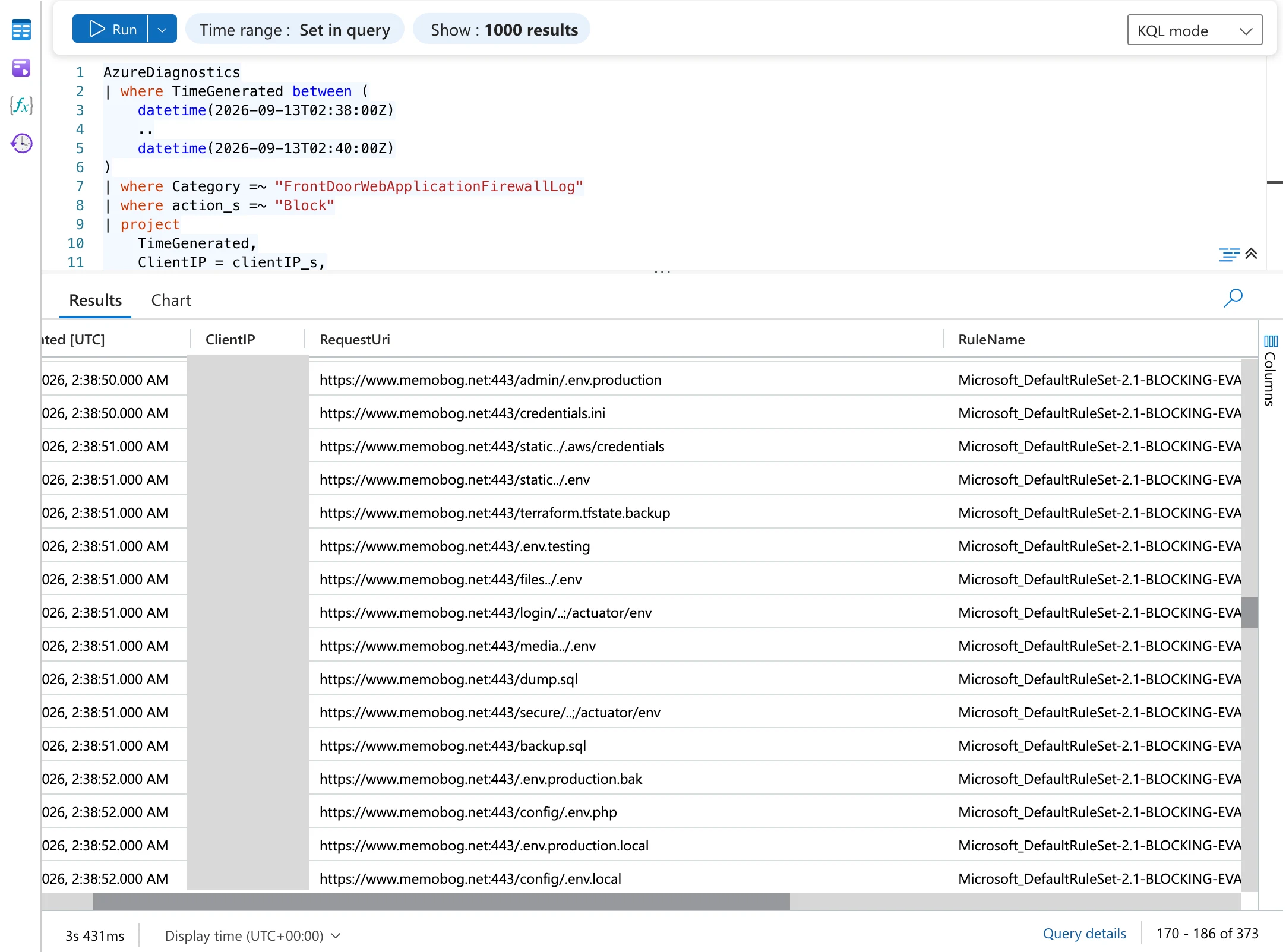
On September 13, 2026, an automated vulnerability scan targeted Memolog. The WAF classified 373 requests as dangerous and blocked them at the edge before they reached the origin.
This retrospective covers how Memolog’s architecture stopped the traffic and what I investigated after the alert. It also separates confirmed facts from the potential impact of running without a WAF.
Table of Contents
- The short version
- How Memolog protects its entry point
- What happened
- Daily trend in observed WAF blocks
- Which WAF rules stopped the scan
- How I investigated the alert
- Requests that passed the WAF and returned 404
- What could have happened without the WAF
- The roles of Azure Monitor and Sentinel
- How much Azure Front Door and WAF do you need?
- What I want to improve
- Summary
- References
The short version
The investigation confirmed the following:
- An automated scan from a single public IP address looked for secret files, configuration files, known vulnerabilities, command execution paths, and similar targets
- Azure Front Door WAF blocked 373 requests that it classified as dangerous
- 32 of those requests targeted
/api/ - None of the 373 blocked requests reached the Azure Static Web Apps or Azure Functions origins
- Some requests that did not match a WAF rule were forwarded downstream, but nonexistent APIs returned
404 Not Found, while static paths ended at the shared404 | MemologHTML page - I found no evidence of secret exposure, unintended application processing, data access, or compromise
- No further WAF blocks from the same source appeared during the period I checked after 02:45 UTC
The WAF did not stop every request. It did, however, block traffic matching attack patterns before it reached the origin, reducing the opportunity for dangerous processing to occur.
My biggest takeaway is that deploying a WAF does not make an application safe by itself. A WAF is one layer that works with application defenses to reduce the chance of an attack reaching a vulnerability and to reduce load on the origin.
How Memolog protects its entry point
Memolog sends all public traffic through Azure Front Door Premium. Azure Static Web Apps serves static content, while /api/* routes to Azure Functions.
The design does not rely on the WAF alone. How FinOps and GDPR Led to Memolog’s Security Improvements covers the broader approach, including Managed Identity, OIDC, Azure Policy, a separate security log, and Microsoft Sentinel.
The WAF policy runs in Prevention mode, not Detection mode. Microsoft documents that Detection mode only logs matching requests, whereas Prevention mode applies the configured action. With a Block action, the WAF responds to the client itself and does not forward the request to the origin.
Memolog configures the WAF’s block response as 429. It also has separate rate limits for the search API, public read API, public write API, and status API.
Restricting direct access to the origin is just as important. An attacker could bypass the WAF by calling the default Azure Functions hostname directly. Memolog’s Function App limits inbound access with the Azure Front Door backend service tag and Front Door ID, so normal traffic must pass through Front Door.
What happened
On September 13, 2026, a single source sent a burst of probing requests over roughly 47 seconds, from 02:38:27 to 02:39:14 UTC (11:38:27 to 11:39:14 Japan time).
The scan targeted paths associated with:
- Secret files that are sometimes exposed by mistake, such as
.envand cloud credentials - Files that can reveal configuration details or clues to credentials, such as
.gitand Terraform state - Path traversal and local/remote file inclusion
- Windows/Unix command injection
- SQL injection
- Nonexistent command execution APIs
This did not look like a targeted attempt based on knowledge of Memolog’s implementation. It looked like an automated vulnerability scanner trying a broad set of known paths and payloads against an internet-facing site.
WHOIS showed that the source IP address was allocated to Google LLC. That tells me only that the traffic may have come from a Google Cloud network. These logs cannot distinguish among a legitimate user’s scan, a compromised VM or container, a leaked account, a proxy, or another explanation. The organization that owns an IP address is not necessarily the attacker.
Daily trend in observed WAF blocks
The incident prompted me to review the daily trend over the past month. Front Door access logs and WAF logs were available only from 14:29 JST on September 12, 2026, a span of about two days. I had no basis for treating earlier dates as zero, so the chart shows only the two days I could actually observe.
I counted unique requests by tracking reference rather than by WAF log row. I also excluded five rate-limit blocks caused by the GitHub Actions Hot Topics i18n check while it checked all items returned by the public API. I identified those five by correlating the node User-Agent, target path, and applied rule with the access logs.
Within this period, blocks occurred on one day. Of the 376 unique blocked requests on September 13, 373 arrived in a 47-second burst around 11:38 JST and probed 272 distinct paths. The paths included /fetch, /proxy, and /.env. That broad sweep of known vulnerable endpoints and secret files looks much more like an automated vulnerability scan than a load test repeatedly hitting a small set of URLs.
Two days of data cannot establish a weekly or monthly trend. I need to keep collecting data under the same definitions and wait for at least one continuous month of logs before reassessing the number of days with blocks, blocked requests, sources, and probed paths.
Which WAF rules stopped the scan
The final block was triggered not by Bot Manager, but by rule 949110 in Microsoft Default Rule Set 2.1.
949110 means Inbound Anomaly Score Exceeded. It is not an individual attack signature. A request can match multiple managed rules, each adding to its anomaly score. When the total reaches the block threshold, 949110 performs the final block.
The main detections that contributed to the score were:
| Classification | Example observed rules | Targeted items |
|---|---|---|
| Access to restricted files | 930130 | Credentials, configuration, repository information, and similar data |
| Remote File Inclusion | 931100, 931130 | Inputs that lead to loading or executing external files |
| Command Injection | 932100, 932110 | Inputs that could be interpreted as OS commands |
| Prohibited file extension | 920440 | File types that should not be publicly exposed |
| SQL Injection | 99031001, etc. | Inputs that manipulate query syntax |
| Path Traversal | 930100, 930110 | References to files outside the public directory |
A single request can match multiple rules, so the number of rule matches is not the number of attack requests. I counted the 373 requests from the access logs and the WAF’s final block actions.
Bot Manager 1.1 also matched rules associated with unknown bots or possible attack tools, but Memolog configures some of those matches with a Log action. In this incident, Bot Manager mainly classified and recorded the automated traffic. The Default Rule Set’s anomaly scoring provided the basis for the final block.
How I investigated the alert
The first notification was an Azure Monitor Severity 1 alert. Every 5 minutes, the rule checks the Front Door WAF logs stored in Log Analytics. It fires if it finds even one /api/ request with a Block action in a 15-minute window.
I investigated in this order:
- Confirm the alert time and query
- Inspect the WAF logs for the action, request URI, client IP address, rule, and tracking reference
- Correlate those records with the Front Door access logs from the same period
- Calculate the number of blocks, API-targeted blocks, and sources, along with the first and last timestamps
- Verify that the blocked requests have no origin URL recorded
- Check the status, route, origin URL, and response size for requests that passed the WAF
- Verify that responses for paths resembling secret files contain the shared 404 HTML rather than actual data
- Check Azure Activity Log and Service Health for configuration changes or Azure incidents at the same time
- Verify that blocks from the same source did not continue after 02:45 UTC
The KQL approach can be simplified to the query below. The actual investigation also correlated individual requests by hostname, time range, tracking reference, and other fields.
AzureDiagnostics
| where Category == "FrontDoorWebApplicationFirewallLog"
| extend WafAction = tostring(action_s)
| extend RequestUri = tostring(requestUri_s)
| extend RequestPath = tostring(parse_url(RequestUri).Path)
| where WafAction =~ "Block"
| summarize
    BlockedRequests = count(),
    ApiBlockedRequests = countif(RequestPath startswith "/api/"),
    FirstSeen = min(TimeGenerated),
    LastSeen = max(TimeGenerated)
None of the 373 requests blocked by the WAF reached the origin. Of those, 32 targeted /api/ paths. I found no Front Door or WAF configuration changes at the same time and no Azure service incident.
Requests that passed the WAF and returned 404
A WAF does not reject every nonexistent URL. Requests that match neither a known attack pattern nor a configured custom rule continue through normal routing.
Some requests in this scan passed the WAF. Their next step depended on whether they targeted a static path or an API path.
404 does not indicate rate limiting. Memolog customizes the WAF block response to 429, so both a rate-limit block and this managed-rule block look like 429 to the client. The WAF log’s rule and action distinguish the cause. The nonexistent endpoints returned 404.
On the static site, some nonexistent paths that resembled secret files were logged with HTTP 200. The status alone looked suspicious, but every response body contained the same 404 | Memolog HTML. The Static Web Apps fallback caused the HTTP status and displayed content to disagree.
This was a good reminder that an HTTP status alone cannot establish a breach or information leak. The route, whether the request reached the origin, content type, response size, and actual response body all matter.
What could have happened without the WAF
This section is a counterfactual, not a description of damage that occurred. Running without a WAF would not necessarily have led to a compromise.
The nonexistent APIs that passed the WAF still ended with 404, because checks in the application, framework, and hosting platform also served as defenses. If deployed assets contain no secrets and no vulnerable endpoint exists, no compromise would result even if every request in the same scan reached downstream components.
Even so, removing the WAF would increase these risks.
1. Exposed secrets could be retrieved
If a build artifact accidentally includes .env, credentials, source maps, repository metadata, Terraform state, or similar files, a simple HTTP request may retrieve them. A WAF does not fix an accidental deployment, but it adds another defense by blocking known discovery patterns at the edge.
2. Payloads could reach unpatched vulnerabilities
If the framework or application has a file inclusion, path traversal, command injection, SQL injection, or similar vulnerability, the payload can reach the vulnerable code. A successful exploit could allow an attacker to read files, alter data, execute arbitrary code remotely, steal credentials, or move laterally to other resources.
3. Increased load on APIs and dependent services
Even a failed intrusion attempt can increase executions, transactions, telemetry, and scale-out if every request reaches Functions, Storage, a database, or an external API. Repeated calls to expensive search or aggregation endpoints can reduce availability and raise cloud costs.
4. Attackers could learn more about the system
Differences among 404, 401, 403, and 500 responses, as well as headers, response bodies, and timing, can reveal clues about real endpoints, technologies, authentication methods, and internal errors. Returning a consistent WAF response for known attack patterns gives an attacker fewer opportunities to observe downstream behavior.
The WAF’s demonstrated benefit was a reduction in the opportunity for attack payloads to reach vulnerabilities or expensive processing, not the prevention of any single confirmed form of harm. A successful defense cannot prove what would otherwise have happened, so that distinction matters.
The roles of Azure Monitor and Sentinel
Microsoft Sentinel did not directly participate in this incident.
| Layer | Role in this incident |
|---|---|
| Azure Front Door WAF | Blocked dangerous requests at the edge |
| Log Analytics | Stored Front Door access logs and WAF logs |
| Azure Monitor | Detected WAF blocks with a Scheduled Query Rule and sent the alert |
| Manual investigation | Correlated WAF and access logs, actual responses, Activity Log, and Service Health |
| Microsoft Sentinel | Did not create an Incident for this event |
Sentinel is not an automatic next stage after the WAF. Its value comes from Analytics Rules that correlate multiple signals, such as a successful API request from the same source immediately after a WAF block, an anomaly in Entra ID or Storage, or a threat intelligence match.
Turning every event like this into a Sentinel Incident would create too many incidents from routine internet scanning.
The division of responsibility is easier to understand this way: WAF provides defense, Azure Monitor provides operational alerts, and Sentinel correlates signs of a broader compromise and manages Incidents.
How much Azure Front Door and WAF do you need?
This experience did not convince me that every personal site or small system needs Azure Front Door Premium. The decision should account for cost, the data being protected, public APIs, origin protection, and the logs you can actually use in operations.
The SKU boundary matters. Azure Front Door Standard supports custom WAF rules and rate limits. Microsoft-managed rule sets such as Default Rule Set 2.1 and Bot Manager are Premium features; Default Rule Set 2.1 performed the block in this incident. Whether you want Microsoft to maintain the known attack patterns is an important part of choosing between Standard and Premium.
Premium has a higher fixed cost than Standard, so protecting a static site alone is not a reason to choose it automatically. Public APIs, authentication, the data involved, and requirements to make the origin private should all shape the decision. Prices change, so check Azure Front Door pricing and the Azure Pricing Calculator when evaluating the options. Azure Front Door Standard vs. Premium has a more detailed SKU comparison.
| Situation | Recommended focus |
|---|---|
| Only static files and no secrets or personal data | Prioritize hosting platform defenses, secure builds, and dependency management |
| Authentication, personal data, or write APIs are exposed | Managed WAF, rate limiting, and origin restrictions become more valuable |
| APIs connect to Storage or databases | In addition to WAF, require input validation, authorization, Managed Identity, and least privilege |
| High-cost search, generative AI, or external APIs | Consider per-endpoint rate limits, quotas, timeouts, and cost alerts |
| Security logs across multiple systems | Correlate in Sentinel and design rules to escalate from single alerts to incidents |
Adopting a WAF does not mean starting with aggressive blocking. Microsoft recommends using Detection mode to observe traffic and false positives, tuning the rules, and then switching to Prevention mode.
The following measures remain necessary with or without a WAF:
- Do not include secrets or unnecessary files in deployment artifacts
- Keep servers and dependencies up to date
- Implement input validation and authorization
- Restrict direct access to the origin
- Use Managed Identity and least privilege
- Enable diagnostic settings and retain access and WAF logs
- Prepare investigation procedures for handling alerts
A WAF is not a substitute for patching vulnerabilities. It is one layer of defense that drops requests between the internet and the application.
What I want to improve
The defenses worked, but the monitoring configuration needs improvement.
Today, the Azure Monitor alert becomes Severity 1 when it sees even one /api/ WAF block in 15 minutes. Isolated scans are common for internet-facing services, so assigning the highest severity to every successful block is too sensitive.
I plan to separate the signals as follows:
- Treat standalone WAF blocks as Severity 2 or 3 and tune thresholds by count, duration, and number of sources
- Assign higher severity to suspicious
2xxresponses that passed the WAF, API5xxresponses, latency, and Storage failures - Create a Sentinel Incident when WAF blocks coincide with anomalies in Entra ID, Functions, Storage, or threat intelligence
- Revisit soft 404 handling in Static Web Apps to align status codes with body content
- Document queries that correlate WAF and access logs by tracking reference in a runbook
This incident made one point very clear: a WAF becomes operationally useful only when accurate alerts and effective investigation are part of the design.
Summary
Azure Front Door WAF classified 373 requests from an automated vulnerability scan against Memolog as dangerous and blocked them at the edge. None reached the origin, reducing the opportunity to invoke downstream APIs or access data.
Requests that passed the WAF ended at an application 404 or the static-site fallback. I found no secret exposure or compromise. The WAF did not achieve that outcome alone; routing, the hosting platform, the application, and origin restrictions all contributed.
During normal operation, the WAF’s fixed cost and operational burden are much easier to see than its value. This real scan made the value tangible: stop an attack before it reaches the origin, keep a record of what was stopped, and use that evidence to explain whether any damage occurred.
When deciding whether to deploy a WAF, the useful question is not whether an attack will arrive. It is what you could lose if an attack payload reaches downstream systems, how much load it could create, and whether you could investigate the event afterward.
References
Microsoft documentation
- Azure Web Application Firewall on Azure Front Door
- Azure Front Door WAF DRS rule groups and rules
- Tune Azure Web Application Firewall for Azure Front Door
- Monitoring data reference for Azure Front Door